mirror of
https://github.com/qdrant/landing_page.git
synced 2026-09-29 07:58:31 +02:00

136 lines
9.0 KiB
Markdown
136 lines
9.0 KiB
Markdown
---
|
|
title: What is Qdrant?
|
|
weight: 9
|
|
aliases:
|
|
- overview
|
|
---
|
|
|
|
# Introduction
|
|
|
|
Vector databases are a relatively new way for interacting with abstract data representations
|
|
derived from opaque machine learning models such as deep learning architectures. These
|
|
representations are often called vectors or embeddings and they are a compressed version of
|
|
the data used to train a machine learning model to accomplish a task like sentiment analysis,
|
|
speech recognition, object detection, and many others.
|
|
|
|
These new databases shine in many applications like [semantic search](https://en.wikipedia.org/wiki/Semantic_search)
|
|
and [recommendation systems](https://en.wikipedia.org/wiki/Recommender_system), and here, we'll
|
|
learn about one of the most popular and fastest growing vector databases in the market, [Qdrant](https://github.com/qdrant/qdrant).
|
|
|
|
## What is Qdrant?
|
|
|
|
[Qdrant](https://github.com/qdrant/qdrant) "is a vector similarity search engine that provides a production-ready
|
|
service with a convenient API to store, search, and manage points (i.e. vectors) with an additional
|
|
payload." You can think of the payloads as additional pieces of information that can help you
|
|
hone in on your search and also receive useful information that you can give to your users.
|
|
|
|
You can get started using Qdrant with the Python `qdrant-client`, by pulling the latest docker
|
|
image of `qdrant` and connecting to it locally, or by trying out [Qdrant's Cloud](https://cloud.qdrant.io/)
|
|
free tier option until you are ready to make the full switch.
|
|
|
|
With that out of the way, let's talk about what are vector databases.
|
|
|
|
## What Are Vector Databases?
|
|
|
|
|
|
|
|
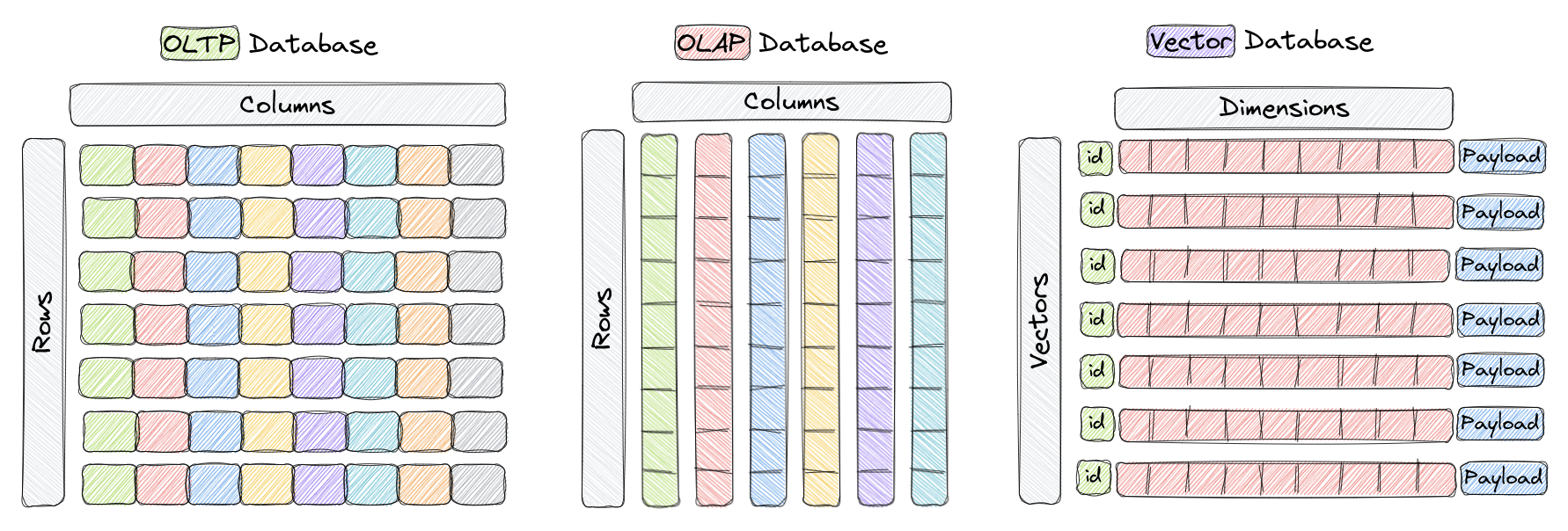
Vector databases are a type of database designed to store and query high-dimensional vectors
|
|
efficiently. In traditional [OLTP](https://www.ibm.com/topics/oltp) and [OLAP](https://www.ibm.com/topics/olap)
|
|
databases (as seen in the image above), data is organized in rows and columns (and these are
|
|
called **Tables**), and queries are performed based on the values in those columns. However,
|
|
in certain applications including image recognition, natural language processing, and recommendation
|
|
systems, data is often represented as vectors in a high-dimensional space, and these vectors, plus
|
|
an id and a payload, are the elements we store in something called a **Collection** within a vector
|
|
database like Qdrant.
|
|
|
|
A vector in this context is a mathematical representation of an object or data point, where elements of
|
|
the vector implicitly or explicitly correspond to specific features or attributes of the object. For example,
|
|
in an image recognition system, a vector could represent an image, with each element of the vector
|
|
representing a pixel value or a descriptor/characteristic of that pixel. In a music recommendation
|
|
system, each vector could represent a song, and elements of the vector would capture song characteristics
|
|
such as tempo, genre, lyrics, and so on.
|
|
|
|
Vector databases are optimized for **storing** and **querying** these high-dimensional vectors
|
|
efficiently, and they often using specialized data structures and indexing techniques such as
|
|
Hierarchical Navigable Small World (HNSW) -- which is used to implement Approximate Nearest
|
|
Neighbors -- and Product Quantization, among others. These databases enable fast similarity
|
|
and semantic search while allowing users to find vectors that are the closest to a given query
|
|
vector based on some distance metric. The most commonly used distance metrics are Euclidean
|
|
Distance, Cosine Similarity, and Dot Product, and these three are fully supported Qdrant.
|
|
|
|
Here's a quick overview of the three:
|
|
- [**Cosine Similarity**](https://en.wikipedia.org/wiki/Cosine_similarity) - Cosine similarity
|
|
is a way to measure how similar two vectors are. To simplify, it reflects whether the vectors
|
|
have the same direction (similar) or are poles apart. Cosine similarity is often used with text representations
|
|
to compare how similar two documents or sentences are to each other. The output of cosine similarity ranges
|
|
from -1 to 1, where -1 means the two vectors are completely dissimilar, and 1 indicates maximum similarity.
|
|
- [**Dot Product**](https://en.wikipedia.org/wiki/Dot_product) - The dot product similarity metric is another way
|
|
of measuring how similar two vectors are. Unlike cosine similarity, it also considers the length of the vectors.
|
|
This might be important when, for example, vector representations of your documents are built
|
|
based on the term (word) frequencies. The dot product similarity is calculated by multiplying the respective values
|
|
in the two vectors and then summing those products. The higher the sum, the more similar the two vectors are.
|
|
If you normalize the vectors (so the numbers in them sum up to 1), the dot product similarity will become
|
|
the cosine similarity.
|
|
- [**Euclidean Distance**](https://en.wikipedia.org/wiki/Euclidean_distance) - Euclidean
|
|
distance is a way to measure the distance between two points in space, similar to how we
|
|
measure the distance between two places on a map. It's calculated by finding the square root
|
|
of the sum of the squared differences between the two points' coordinates. This distance metric
|
|
is also commonly used in machine learning to measure how similar or dissimilar two vectors are.
|
|
|
|
Now that we know what vector databases are and how they are structurally different than other
|
|
databases, let's go over why they are important.
|
|
|
|
## Why do we need Vector Databases?
|
|
|
|
Vector databases play a crucial role in various applications that require similarity search, such
|
|
as recommendation systems, content-based image retrieval, and personalized search. By taking
|
|
advantage of their efficient indexing and searching techniques, vector databases enable faster
|
|
and more accurate retrieval of unstructured data already represented as vectors, which can
|
|
help put in front of users the most relevant results to their queries.
|
|
|
|
In addition, other benefits of using vector databases include:
|
|
1. Efficient storage and indexing of high-dimensional data.
|
|
3. Ability to handle large-scale datasets with billions of data points.
|
|
4. Support for real-time analytics and queries.
|
|
5. Ability to handle vectors derived from complex data types such as images, videos, and natural language text.
|
|
6. Improved performance and reduced latency in machine learning and AI applications.
|
|
7. Reduced development and deployment time and cost compared to building a custom solution.
|
|
|
|
Keep in mind that the specific benefits of using a vector database may vary depending on the
|
|
use case of your organization and the features of the database you ultimately choose.
|
|
|
|
Let's now evaluate, at a high-level, the way Qdrant is architected.
|
|
|
|
## High-Level Overview of Qdrant's Architecture
|
|
|
|
|
|
|
|
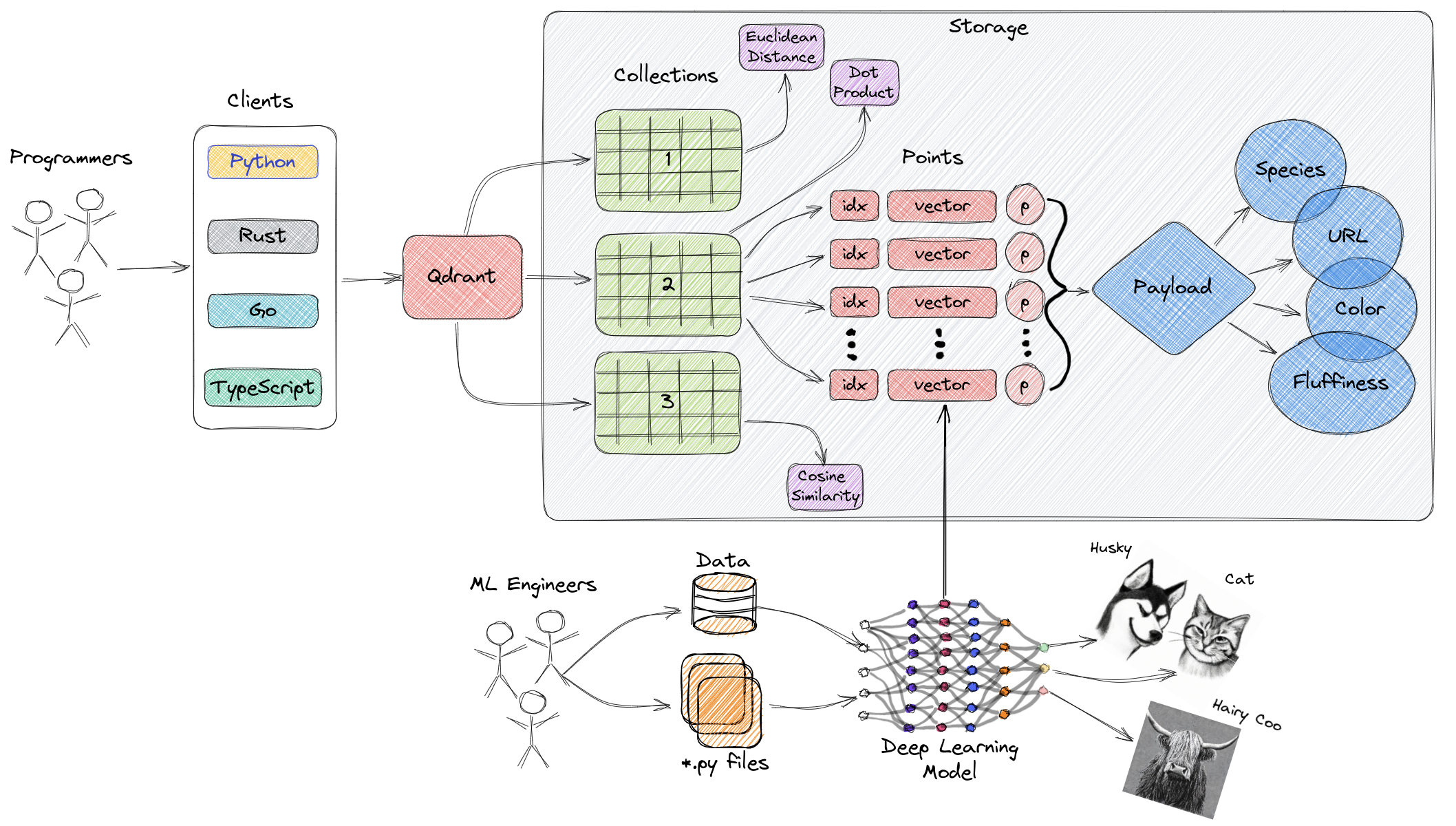
The diagram above represents a high-level overview of some of the main components of Qdrant. Here
|
|
are the terminologies you should get familiar with.
|
|
|
|
- [Collections](../concepts/collections/): A collection is a named set of points (vectors with a payload) among which you can search. The vector of each point within the same collection must have the same dimensionality and be compared by a single metric. [Named vectors](../concepts/collections/#collection-with-multiple-vectors) can be used to have multiple vectors in a single point, each of which can have their own dimensionality and metric requirements.
|
|
- [Distance Metrics](https://en.wikipedia.org/wiki/Metric_space): These are used to measure
|
|
similarities among vectors and they must be selected at the same time you are creating a
|
|
collection. The choice of metric depends on the way the vectors were obtained and, in particular,
|
|
on the neural network that will be used to encode new queries.
|
|
- [Points](../concepts/points/): The points are the central entity that
|
|
Qdrant operates with and they consist of a vector and an optional id and payload.
|
|
- id: a unique identifier for your vectors.
|
|
- Vector: a high-dimensional representation of data, for example, an image, a sound, a document, a video, etc.
|
|
- [Payload](../concepts/payload/): A payload is a JSON object with additional data you can add to a vector.
|
|
- [Storage](../concepts/storage/): Qdrant can use one of two options for
|
|
storage, **In-memory** storage (Stores all vectors in RAM, has the highest speed since disk
|
|
access is required only for persistence), or **Memmap** storage, (creates a virtual address
|
|
space associated with the file on disk).
|
|
- Clients: the programming languages you can use to connect to Qdrant.
|
|
|
|
## Next Steps
|
|
|
|
Now that you know more about vector databases and Qdrant, you are ready to get started with one
|
|
of our tutorials. If you've never used a vector database, go ahead and jump straight into
|
|
the **Getting Started** section. Conversely, if you are a seasoned developer in these
|
|
technology, jump to the section most relevant to your use case.
|
|
|
|
As you go through the tutorials, please let us know if any questions come up in our
|
|
[Discord channel here](https://qdrant.to/discord). 😎
|