mirror of
https://github.com/qdrant/landing_page.git
synced 2026-09-26 06:28:30 +02:00

351 lines
8.9 KiB
Markdown
351 lines
8.9 KiB
Markdown
---
|
|
title: Quickstart
|
|
weight: 11
|
|
aliases:
|
|
- quick_start
|
|
---
|
|
|
|
# Quickstart
|
|
|
|
## Installation
|
|
|
|
The easiest way to use Qdrant is to run a pre-built image. To do this, make sure Docker is installed on your system.
|
|
|
|
Download image from [DockerHub](https://hub.docker.com/r/qdrant/qdrant):
|
|
|
|
```bash
|
|
docker pull qdrant/qdrant
|
|
```
|
|
|
|
And run the service inside the docker:
|
|
|
|
```bash
|
|
docker run -p 6333:6333 \
|
|
-v $(pwd)/qdrant_storage:/qdrant/storage \
|
|
qdrant/qdrant
|
|
```
|
|
|
|
In this case Qdrant will use default configuration and store all data under `./qdrant_storage` directory.
|
|
|
|
Now Qdrant should be accessible at [localhost:6333](http://localhost:6333)
|
|
|
|
<aside role="status">Qdrant has no encryption or authentication by default and new instances are open to everyone. Please read <a href="https://qdrant.tech/documentation/security/">Security</a> carefully for details on how to secure your instance.</aside>
|
|
|
|
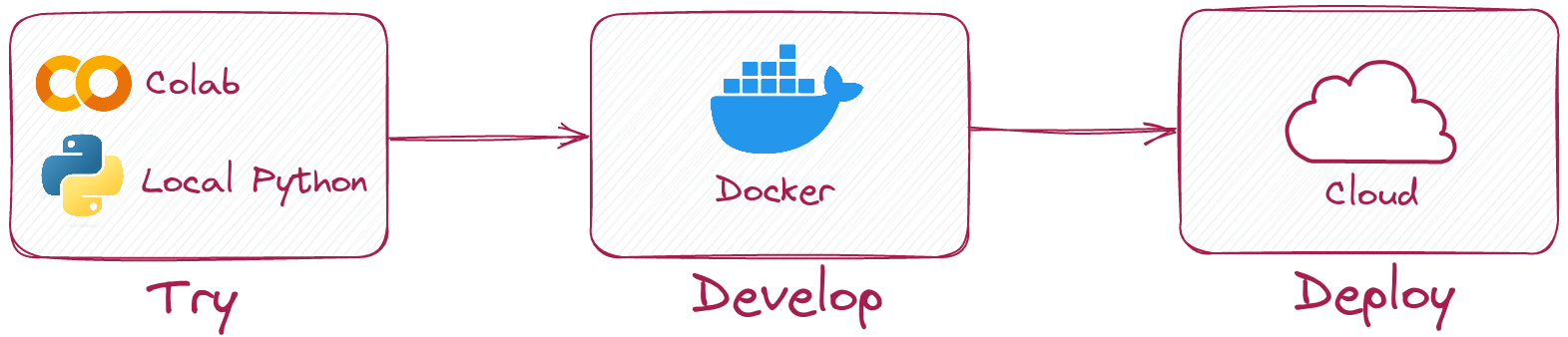
### Local mode
|
|
|
|
|
|
|
|
|
|
With python client it is possible to try Qdrant without running docker container at all.
|
|
|
|
Simply install it
|
|
|
|
```
|
|
pip install qdrant-client
|
|
```
|
|
|
|
and initialize client like this:
|
|
|
|
```
|
|
from qdrant_client import QdrantClient
|
|
|
|
client = QdrantClient(":memory:")
|
|
# or
|
|
client = QdrantClient(path="path/to/db") # Persists changes to disk
|
|
```
|
|
|
|
Local mode is useful for development, prototyping and testing.
|
|
|
|
* You can use it to run tests in your CI/CD pipeline.
|
|
* Run it in Colab or Jupyter Notebook, no extra dependencies required. See a [Colab Example](https://colab.research.google.com/drive/1Bz8RSVHwnNDaNtDwotfPj0w7AYzsdXZ-?usp=sharing)
|
|
* When you need to scale, simply switch to server mode.
|
|
|
|
|
|
## API
|
|
|
|
All interaction with Qdrant takes place via the REST API.
|
|
|
|
This example covers the most basic use-case - collection creation and basic vector search.
|
|
For additional information please refer to the [API documentation](https://qdrant.github.io/qdrant/redoc/index.html).
|
|
|
|
### gRPC
|
|
|
|
In addition to REST API, Qdrant also supports gRPC interface.
|
|
To enable gPRC interface, specify the following lines in the [configuration file](https://github.com/qdrant/qdrant/blob/master/config/config.yaml):
|
|
|
|
```yaml
|
|
service:
|
|
grpc_port: 6334
|
|
```
|
|
|
|
gRPC interface will be available on the specified port.
|
|
The gRPC methods follow the same principles as REST. For each REST endpoint, there is a corresponding gRPC method.
|
|
Documentation on all available gRPC methods and structures is available here - [gRPC Documentation](https://github.com/qdrant/qdrant/blob/master/docs/grpc/docs.md).
|
|
|
|
The choice between gRPC and the REST API is a trade-off between convenience and speed.
|
|
gRPC is a binary protocol and can be more challenging to debug.
|
|
We recommend switching to it if you are already familiar with Qdrant and are trying to optimize the performance of your application.
|
|
|
|
If you are applying Qdrant for the first time or working on a prototype, you might prefer to use REST.
|
|
|
|
### Clients
|
|
|
|
Qdrant provides a set of clients for different programming languages. You can find them here:
|
|
|
|
* [Python](https://github.com/qdrant/qdrant-client) - `pip install qdrant-client`
|
|
* [Rust](https://github.com/qdrant/rust-client) - `cargo add qdrant-client`
|
|
* [Go](https://github.com/qdrant/go-client) - `go get github.com/qdrant/go-client`
|
|
* [Javascript](https://github.com/qdrant/qdrant-js) - `npm install @qdrant/js-client-rest`
|
|
|
|
If you are using a language that is not listed here, you can use the REST API directly or generate a client for your language
|
|
using [OpenAPI](https://github.com/qdrant/qdrant/blob/master/docs/redoc/master/openapi.json)
|
|
or [protobuf](https://github.com/qdrant/qdrant/tree/master/lib/api/src/grpc/proto) definitions.
|
|
|
|
### Create collection
|
|
|
|
First - let's create a collection with dot-production metric.
|
|
|
|
```bash
|
|
curl -X PUT 'http://localhost:6333/collections/test_collection' \
|
|
-H 'Content-Type: application/json' \
|
|
--data-raw '{
|
|
"vectors": {
|
|
"size": 4,
|
|
"distance": "Dot"
|
|
}
|
|
}'
|
|
```
|
|
|
|
```python
|
|
from qdrant_client import QdrantClient
|
|
from qdrant_client.http.models import Distance, VectorParams
|
|
|
|
client = QdrantClient("localhost", port=6333)
|
|
client.recreate_collection(
|
|
collection_name="test_collection",
|
|
vectors_config=VectorParams(size=4, distance=Distance.DOT),
|
|
)
|
|
```
|
|
|
|
Expected response:
|
|
|
|
```json
|
|
{
|
|
"result": true,
|
|
"status": "ok",
|
|
"time": 0.031095451
|
|
}
|
|
```
|
|
|
|
We can ensure that collection was created:
|
|
|
|
```bash
|
|
curl 'http://localhost:6333/collections/test_collection'
|
|
```
|
|
|
|
```python
|
|
collection_info = client.get_collection(collection_name="test_collection")
|
|
```
|
|
|
|
Expected response:
|
|
|
|
```json
|
|
{
|
|
"result": {
|
|
"status": "green",
|
|
"vectors_count": 0,
|
|
"segments_count": 5,
|
|
"disk_data_size": 0,
|
|
"ram_data_size": 0,
|
|
"config": {
|
|
"params": {
|
|
"vectors": {
|
|
"size": 4,
|
|
"distance": "Dot"
|
|
}
|
|
},
|
|
"hnsw_config": { ... },
|
|
"optimizer_config": { ... },
|
|
"wal_config": { ... }
|
|
}
|
|
},
|
|
"status": "ok",
|
|
"time": 2.1199e-05
|
|
}
|
|
```
|
|
|
|
```python
|
|
from qdrant_client.http.models import CollectionStatus
|
|
|
|
assert collection_info.status == CollectionStatus.GREEN
|
|
assert collection_info.vectors_count == 0
|
|
```
|
|
|
|
### Add points
|
|
|
|
Let's now add vectors with some payload:
|
|
|
|
```bash
|
|
curl -L -X PUT 'http://localhost:6333/collections/test_collection/points?wait=true' \
|
|
-H 'Content-Type: application/json' \
|
|
--data-raw '{
|
|
"points": [
|
|
{"id": 1, "vector": [0.05, 0.61, 0.76, 0.74], "payload": {"city": "Berlin" }},
|
|
{"id": 2, "vector": [0.19, 0.81, 0.75, 0.11], "payload": {"city": ["Berlin", "London"] }},
|
|
{"id": 3, "vector": [0.36, 0.55, 0.47, 0.94], "payload": {"city": ["Berlin", "Moscow"] }},
|
|
{"id": 4, "vector": [0.18, 0.01, 0.85, 0.80], "payload": {"city": ["London", "Moscow"] }},
|
|
{"id": 5, "vector": [0.24, 0.18, 0.22, 0.44], "payload": {"count": [0] }},
|
|
{"id": 6, "vector": [0.35, 0.08, 0.11, 0.44]}
|
|
]
|
|
}'
|
|
```
|
|
|
|
```python
|
|
from qdrant_client.http.models import PointStruct
|
|
|
|
operation_info = client.upsert(
|
|
collection_name="test_collection",
|
|
wait=True,
|
|
points=[
|
|
PointStruct(id=1, vector=[0.05, 0.61, 0.76, 0.74], payload={"city": "Berlin"}),
|
|
PointStruct(id=2, vector=[0.19, 0.81, 0.75, 0.11], payload={"city": ["Berlin", "London"]}),
|
|
PointStruct(id=3, vector=[0.36, 0.55, 0.47, 0.94], payload={"city": ["Berlin", "Moscow"]}),
|
|
PointStruct(id=4, vector=[0.18, 0.01, 0.85, 0.80], payload={"city": ["London", "Moscow"]}),
|
|
PointStruct(id=5, vector=[0.24, 0.18, 0.22, 0.44], payload={"count": [0]}),
|
|
PointStruct(id=6, vector=[0.35, 0.08, 0.11, 0.44]),
|
|
]
|
|
)
|
|
```
|
|
|
|
|
|
Expected response:
|
|
|
|
```json
|
|
{
|
|
"result": {
|
|
"operation_id": 0,
|
|
"status": "completed"
|
|
},
|
|
"status": "ok",
|
|
"time": 0.000206061
|
|
}
|
|
```
|
|
|
|
```python
|
|
from qdrant_client.http.models import UpdateStatus
|
|
|
|
assert operation_info.status == UpdateStatus.COMPLETED
|
|
```
|
|
|
|
### Search with filtering
|
|
|
|
Let's start with a basic request:
|
|
|
|
```bash
|
|
curl -L -X POST 'http://localhost:6333/collections/test_collection/points/search' \
|
|
-H 'Content-Type: application/json' \
|
|
--data-raw '{
|
|
"vector": [0.2,0.1,0.9,0.7],
|
|
"limit": 3
|
|
}'
|
|
```
|
|
|
|
```python
|
|
search_result = client.search(
|
|
collection_name="test_collection",
|
|
query_vector=[0.2, 0.1, 0.9, 0.7],
|
|
limit=3
|
|
)
|
|
```
|
|
|
|
Expected response:
|
|
|
|
```json
|
|
{
|
|
"result": [
|
|
{ "id": 4, "score": 1.362 },
|
|
{ "id": 1, "score": 1.273 },
|
|
{ "id": 3, "score": 1.208 }
|
|
],
|
|
"status": "ok",
|
|
"time": 0.000055785
|
|
}
|
|
```
|
|
|
|
```python
|
|
assert len(search_result) == 3
|
|
|
|
print(search_result[0])
|
|
# ScoredPoint(id=4, score=1.362, ...)
|
|
|
|
print(search_result[1])
|
|
# ScoredPoint(id=1, score=1.273, ...)
|
|
|
|
print(search_result[2])
|
|
# ScoredPoint(id=3, score=1.208, ...)
|
|
```
|
|
|
|
But result is different if we add a filter:
|
|
|
|
```bash
|
|
curl -L -X POST 'http://localhost:6333/collections/test_collection/points/search' \
|
|
-H 'Content-Type: application/json' \
|
|
--data-raw '{
|
|
"filter": {
|
|
"should": [
|
|
{
|
|
"key": "city",
|
|
"match": {
|
|
"value": "London"
|
|
}
|
|
}
|
|
]
|
|
},
|
|
"vector": [0.2, 0.1, 0.9, 0.7],
|
|
"limit": 3
|
|
}'
|
|
```
|
|
|
|
```python
|
|
from qdrant_client.http.models import Filter, FieldCondition, MatchValue
|
|
|
|
|
|
search_result = client.search(
|
|
collection_name="test_collection",
|
|
query_vector=[0.2, 0.1, 0.9, 0.7],
|
|
query_filter=Filter(
|
|
must=[
|
|
FieldCondition(
|
|
key="city",
|
|
match=MatchValue(value="London")
|
|
)
|
|
]
|
|
),
|
|
limit=3
|
|
)
|
|
```
|
|
|
|
Expected response:
|
|
|
|
```json
|
|
{
|
|
"result": [
|
|
{ "id": 4, "score": 1.362 },
|
|
{ "id": 2, "score": 0.871 }
|
|
],
|
|
"status": "ok",
|
|
"time": 0.000093972
|
|
}
|
|
```
|
|
|
|
|
|
```python
|
|
assert len(search_result) == 2
|
|
|
|
print(search_result[0])
|
|
# ScoredPoint(id=4, score=1.362, ...)
|
|
|
|
print(search_result[1])
|
|
# ScoredPoint(id=2, score=0.871, ...)
|
|
```
|